
About this site
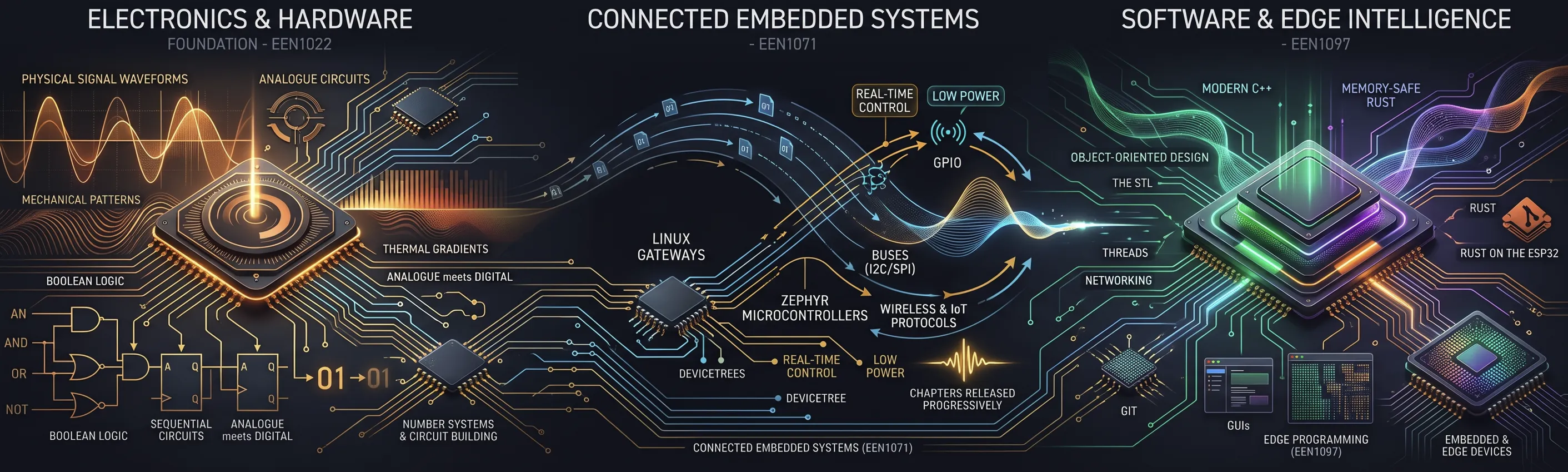
This site holds the interactive textbooks for three modules that I teach in the School of Electronic Engineering at Dublin City University. Each book is written in the open while the module runs, so pages are added and revised during the semester. If you find an error or have a suggestion, please use the Submit Errata & Suggestions link in the menu, or the link at the bottom of every page.
The books
Section titled “The books”- Edge Programming (EEN1097) covers modern C++ and Rust for embedded and edge devices: object-oriented design, the STL, Git, threads, networking, GUIs and Rust on the ESP32.
- Digital & Analogue Electronics (EEN1022) runs from number systems and building circuits, through analogue devices, Boolean logic, combinational and sequential circuits, to where analogue meets digital.
- Connected Embedded Systems (EEN1071) brings the two together across a network: Linux gateways, Zephyr microcontrollers, Devicetree, GPIO, buses, real-time control, low power, wireless and IoT protocols. Its chapters are released one at a time as they are completed.
My earlier books, Exploring Raspberry Pi and Exploring BeagleBone, are published by Wiley. Parts of both are revised and extended here.
Why the books are interactive
Section titled “Why the books are interactive”Most pages include small interactive figures and labs: circuits you can drive, code you can step through, and simulations with the settings exposed. The aim is that you read a short section, then test the claim it makes, and find out what happens when you change a value. Many labs have a full screen presentation mode, because I also use them in lectures.
The reason is how a technical subject is learned. Reading an explanation, even a good one, tells you what the author says happens. Changing a value and watching the result shows you what does happen, and it shows you where your own understanding was wrong. A printed book cannot do this: a figure shows one setting of a circuit or one state of a program, and you have to imagine the rest. Here you can step through a program a line at a time, sweep a resistor across its range, or rerun a simulation with different settings, and see each case for yourself. Many of the labs ask you to predict the result before they show it, because comparing your prediction with the result tells you which part of your understanding needs more work.
The knowledge checks at the end of each section and the knowledge test at the end of each chapter do a related job. It is easy to read several pages, recognise every sentence, and still not be able to use any of it. A few short questions tell you quickly whether you followed the section. If you cannot answer them, it is often a sign that your attention drifted while you were reading, and that the section is worth reading again before you move on. The questions are for your own self-assessment, so a wrong answer costs you nothing.
Some ideas are also easier to understand from a simulation than from writing code. Git is a good example. Its commands are short, but what they do to the repository (the commits, the branches and where each one points) cannot be seen at the command line, and it is easy to get lost typing commands without that picture. The Git workflow and Git branching labs draw the repository as you run each command, so you can see what a commit, a branch or a merge does before you try it on a real project. In the same way, the electronics and embedded labs show signals that would otherwise need an oscilloscope or a logic analyser to see.
The simulations do not replace the hardware, or writing your own code. Each one models part of a real system and states what it leaves out. Their job is to give you a working picture of what should happen before you sit down at the bench or the keyboard. They also make the books livelier to work through than pages of text alone, which helps when you are reading a long chapter.
Where the content comes from
Section titled “Where the content comes from”The content of these books comes from the modules I teach at DCU, and it has been built up in them over many years. New material usually starts on my blog, derekmolloy.ie, where I try out current boards, tools and techniques on real hardware and write up what works and what does not. Once I have had time to bring a topic together, I work out where it fits in the modules I teach and integrate it into the lectures and labs, where I can see which explanations students follow and where they get stuck. The same process produced my YouTube videos and, later, the material in my books. This site is built the same way: it follows how I integrate material into my modules.
The material has also changed form along the way. It started in DocBook, moved to HTML websites, then to Google Docs, and this site is its current form. Each move has involved rewriting and extending the material, and the interactive figures are the newest part of it.
How the books are written
Section titled “How the books are written”From an MDX file to your browser
Click any block or arrow, or follow one quiz from the page I write to the page you read.
Nothing selected. Start with “1. Write the page” to follow one quiz through the whole system.
Figure 1. How a page of this site is written, stored, built and served. Click any block or arrow for an explanation.
The source for every page is a Markdown file (strictly, MDX, which is Markdown that can include components) in an Obsidian vault on my own computer. Obsidian lets me write, link and search across all three books and my notes in one place. The vault is a Git repository, and the Obsidian Git plugin commits and pushes it to a private GitHub repository every few minutes, so every change is recorded and can be undone.
Each page has a draft flag in its frontmatter. A page with draft: true appears only on my development server; setting it to false releases the page to this site on the next build. That one flag is the only difference between what I am working on and what you see here.
Figure 1 shows how the pieces fit together, from the file I write to the page you read. To see what happens to one quiz along the way, use the Follow one quiz buttons: its question and answers are written as props in the MDX, one React component draws every quiz on the site, and the build turns the two into a page whose quiz works in your browser.
How the site is built
Section titled “How the site is built”The site is built with Astro and Starlight, Astro’s documentation framework, which provides the navigation, search, light and dark themes, and the page layout.
The interactive figures are React components, styled with Tailwind CSS. Astro renders each page to static HTML and loads the JavaScript only for the components on that page (“islands”), so pages stay fast.
The site runs in Docker containers on a small server in my garage:
- A sync container pulls the book content and the components from the Git repository every 15 minutes.
- A development container runs Astro’s development server, which shows draft pages and updates as soon as new content arrives. This is where I check pages before releasing them.
- A production container builds the static site, leaving out draft pages, and serves it to you.
How AI is used
Section titled “How AI is used”I use Claude Code, Anthropic’s AI coding assistant, mainly to build and test the interactive components: it writes and debugs the React code, renders the figures in light and dark mode at different screen sizes, and checks that every page compiles. It would not be possible for me to write the code for the demos on this site by hand, as many of them run to more than 1,000 lines of JSX. I check every component against my own understanding of the topic, but I cannot try every combination of settings in every demo. If you spot an error, please let me know using the Submit Errata & Suggestions link in the menu.
I also use Claude Code to review drafts for errors, check facts and keep the style consistent across the books. I decide what each book covers and how it is structured, I write and edit the text, and I check the components and pages before they are released.
I use T3 Code, an open-source control plane for coding agents, to orchestrate this work across the three books.
Some of the images are generated with Google’s Gemini image model (Nano Banana). I also use Gemini and Claude models to help write the multiple-choice questions. The hardest part of a multiple-choice question is the wrong answers: each one has to be plausible and about the same length as the correct one, and I have spent a lot of time over the years writing them by hand.
Who I am
Section titled “Who I am”
I am Derek Molloy, a Professor in the School of Electronic Engineering at Dublin City University (DCU), where I have worked for over 25 years. My research is on hardware and software for real-time edge applications: connected embedded systems, edge processing, and hardware/software co-design. Much of it applies machine learning on embedded devices, for tasks such as anomaly detection and 3D reconstruction, within the compute, memory, power and thermal limits of small hardware. On the embedded Linux side, I work with kernel drivers, device trees and hardware interfacing, including MPSoCs.
I wrote Exploring Raspberry Pi (Wiley, 2016) and Exploring BeagleBone (Wiley, second edition, 2019), which are used on university courses and have been translated into Chinese, Korean and Spanish. My YouTube channel, @DerekMolloyDCU, has lectures and walk-throughs from more than a decade of teaching, from Linux device drivers to microcontroller programming. In all of it, including this site, I want to take students past “it compiles” to systems that work in the field.
My blog, derekmolloy.ie, covers embedded systems, edge AI, Zephyr, embedded Rust and the Linux side of connected devices. My code is on GitHub, and there is more about me at derekmolloy.ie/about.
© 2026 Derek Molloy, Dublin City University. All rights reserved.