
2.1 Gateway hardware and options
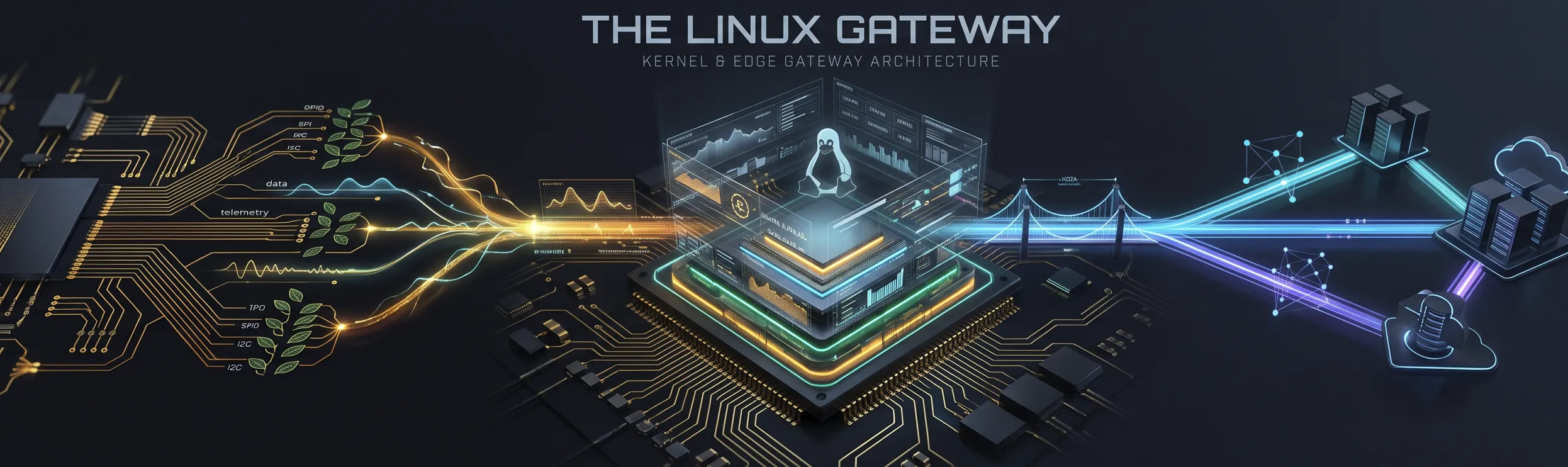
In Chapter 1, we established why connected embedded systems split naturally into two cooperating tiers: resource-constrained microcontroller leaf nodes (such as the ESP32 running Zephyr RTOS) that handle microsecond-level sensing and low-power wireless links, and embedded Linux gateways that aggregate telemetry, run local message brokers and databases, host graphical interfaces, and bridge local fieldbuses to enterprise IP networks.
Before you power up your board or log into a shell, you need to understand the physical hardware underneath the operating system. Unlike a desktop PC, where a standardised motherboard, UEFI firmware, and PCI Express bus hide chip-level wiring from the programmer, an embedded Linux gateway exposes pins wired directly to the pads of a System-on-Chip (SoC). Connecting the wrong voltage to a header pin, overloading a 3.3 V rail, or misunderstanding which pins are reserved for boot firmware can permanently damage the processor.
This section examines our primary laboratory gateway, the Raspberry Pi 4 Model B, alongside the Raspberry Pi 5, industrial System-on-Module deployments, the BeagleBone and BeagleY-AI open-hardware platforms, and emerging “dual-brain” boards such as the Arduino UNO Q that place a Linux application processor and a Zephyr microcontroller on the same PCB.
What makes a board an embedded Linux gateway?
Section titled “What makes a board an embedded Linux gateway?”Every gateway board in this chapter is built around an Application Processor (typically an Arm Cortex-A series core) rather than a microcontroller. While the boards differ in form factor, I/O count, and industrial ruggedisation, they share five architectural features required to run mainline Linux:
- A Hardware Memory Management Unit (MMU): Translates virtual memory addresses into physical DRAM addresses, isolating every user-space process (
mosquitto,sshd, your C++ sensor daemon) in its own protected address space so a pointer bug in one application cannot corrupt the kernel or another service. - External high-density DRAM (
512 MBto16 GB): Connected over a high-speed 32-bit or 64-bit DDR3/LPDDR4/LPDDR4X memory controller, providing orders of magnitude more memory than the tens to hundreds of kilobytes of on-chip SRAM inside a microcontroller. - Non-volatile mass storage: A microSD card slot, soldered eMMC flash (
4–64 GB), or a PCIe NVMe solid-state drive holding the bootloader files, the compiled Devicetree blob (.dtb), the Linux kernel image, and a POSIX root file system. - High-speed network interfaces: Native Gigabit Ethernet (often via an external RGMII PHY), dual-band Wi-Fi (
802.11ac/ax), and Bluetooth Low Energy (BLE), enabling the gateway to act simultaneously as a local wireless border router and an IP host. - Multiplexed low-level expansion headers: Pin headers exposing
3.3 Vgeneral-purpose I/O (GPIO), I²C, SPI, UART, and PWM controllers so the Linux gateway can also talk directly to board-level sensors, ADCs, and transceivers.
The Raspberry Pi 4 Model B (primary lab gateway) and Raspberry Pi 5
Section titled “The Raspberry Pi 4 Model B (primary lab gateway) and Raspberry Pi 5”Throughout this module, our primary laboratory gateway is the Raspberry Pi 4 Model B (1, 2, 3, 4 or 8 GB LPDDR4),2 with the Raspberry Pi 5 (1, 2, 4, 8 or 16 GB LPDDR4X) supported side-by-side.3 Memory costs pushed Raspberry Pi prices up three times during 20264 (from 1 October 2026 a 2 GB Pi 4 lists at $67.50 and a 2 GB Pi 5 at $77.50)5, which makes high-memory boards expensive for student kits, so the Raspberry Pi 4 remains the cost-effective workhorse for learning embedded Linux: every kernel subsystem, Devicetree overlay, libgpiod v2 API, I²C/SPI character device, and systemd unit you write in this book runs identically on both boards.
Where the two boards differ is in how their I/O subsystems are wired inside the silicon (Table 2.1).
Table 2.1. Architectural comparison of the Raspberry Pi 4 Model B and Raspberry Pi 5 gateways.
| Feature | Raspberry Pi 4 Model B (Lab Standard) | Raspberry Pi 5 (High-Performance Comparison) |
|---|---|---|
| Application SoC | Broadcom BCM2711 (28 nm)6 | Broadcom BCM2712 (16 nm)7 |
| CPU Cores & ISA | Quad-core Arm Cortex-A72 @ 1.5–1.8 GHz (64-bit ARMv8-A, out-of-order) | Quad-core Arm Cortex-A76 @ 2.4 GHz (64-bit ARMv8.2-A, with hardware crypto extensions)3 |
| Memory | 1, 2, 3, 4, or 8 GB LPDDR4-3200 | 1, 2, 4, 8, or 16 GB LPDDR4X-4267 |
| I/O Controller Architecture | Monolithic on-SoC: 40-pin GPIO, I²C, SPI, UART, and PWM live directly inside the BCM2711 die; USB 3.0 via external PCIe VL805 hub | Split architecture: BCM2712 connects over 4-lane PCIe 2.0 to the Raspberry Pi RP1 I/O Southbridge, which drives the 40-pin header, USB, Ethernet, and MIPI7 |
| Network Interfaces | Gigabit Ethernet (Broadcom BCM54213PE PHY over RGMII), 802.11ac Wi-Fi 5, Bluetooth 5.0 / BLE | Gigabit Ethernet (BCM54213PE via RP1), 802.11ac Wi-Fi 5, Bluetooth 5.0 / BLE |
| Storage Interfaces | microSD card slot (DDR50, ~40–45 MB/s), USB 3.0 mass storage | microSD card slot (SDR104) + external 1-lane PCIe 2.0/3.0 FFC connector for M.2 NVMe SSDs (~450–850 MB/s) or an AI HAT+ accelerator |
| On-board Real-Time Clock | None (requires NTP over network or external I²C RTC such as DS3231 in Assignment 1) | Built-in RTC inside PMIC with dedicated J5 battery connector for a rechargeable ML2020 lithium coin cell8 |
| Power Button & Debug UART | Unpopulated RUN / GLOBAL_EN reset pads; UART shares pins 8 & 10 on the 40-pin header | Physical on-board power button (connected to PMIC & Linux input subsystem) + dedicated 3-pin JST-SH debug UART connector9 |
| Recommended Power Supply | 5.1 V / 3.0 A (15.3 W) via USB-C | 5.1 V / 5.0 A (27 W USB-C Power Delivery), which raises the USB peripheral current limit to the full 1.6 A8 |
Inside the Raspberry Pi 4 Model B
Section titled “Inside the Raspberry Pi 4 Model B”Compared to earlier Raspberry Pi generations (Pi 1 through Pi 3B+), where Ethernet and all USB ports shared a single 480 Mbit/s USB 2.0 root hub (LAN9514 / LAN7515), the Raspberry Pi 4 separates its high-speed buses cleanly:
- The BCM2711 SoC provides a dedicated RGMII (Reduced Gigabit Media Independent Interface) path directly to the Broadcom
BCM54213PEGigabit Ethernet transceiver, allowing true940 Mbit/sTCP throughput without contending with USB traffic.6 - A dedicated single-lane PCI Express 2.0 link connects the SoC to a VIA Labs
VL805USB 3.0 host controller, providing two5 Gbit/sUSB 3.0 ports alongside two USB 2.0 ports.6 - The USB-C power receptacle also exposes the SoC’s DesignWare USB 2.0 OTG (
dwc2) controller, allowing a Raspberry Pi 4 or Pi 5 to act as a USB Ethernet or serial gadget when plugged into a host laptop (Section 2.4).
Why the Raspberry Pi 5’s RP1 southbridge matters for software
Section titled “Why the Raspberry Pi 5’s RP1 southbridge matters for software”As we saw briefly in Chapter 1, the Raspberry Pi 5 moves almost all low-speed and medium-speed peripherals off the main 16 nm processor die and into the RP1 (40 nm) southbridge chip over a 4-lane PCIe bus.9
For well-behaved Linux software that uses kernel character devices (such as /dev/gpiochip* via libgpiod v2 (Chapter 6), /dev/i2c-* (Chapter 8), /dev/spidev*, and /sys/class/leds/), this hardware change is almost completely hidden by the Linux kernel and Devicetree. However, older libraries (such as the original wiringPi, now maintained as a community fork, or legacy pigpio code) that mapped a hardcoded physical BCM2835/BCM2711 register address via /dev/mem fail immediately on the Pi 5 because those registers now live across a PCIe bridge at a different physical base address inside the RP1. This is a practical demonstration of why modern embedded Linux engineering relies on kernel device models and Devicetree abstractions rather than hardcoded user-space register pokes.
The 40-pin GPIO header budget and HAT / HAT+ EEPROMs
Section titled “The 40-pin GPIO header budget and HAT / HAT+ EEPROMs”Since the Raspberry Pi Model B+ in 2014, every full-sized Raspberry Pi (and Zero) has shared the same 40-pin, 2.54 mm pitch (0.1 inch) expansion header (J8).8 Understanding how those 40 pins are allocated (the header pin budget) is essential before wiring any circuit:
The 40-pin header budget
Pick a category or function, or click any pin.
Board turned a quarter-turn clockwise: header down the right-hand edge, pin 1 at the top (square pad), the same order as the pinout list. Odd pins are the inner row.
4 power + 8 ground + 2 HAT ID + 26 GPIO = 40 pins. Pick a category to see where each group sits.
Figure 2.1. The 40-pin header budget on the Raspberry Pi 4 and 5: 4 power + 8 ground + 2 HAT ID + 26 user GPIOs = 40 pins.
HATs, HAT+, and the ID EEPROM (ID_SD and ID_SC)
Section titled “HATs, HAT+, and the ID EEPROM (ID_SD and ID_SC)”On an x86 desktop, plugging a card into a PCI Express or USB port triggers automatic hardware enumeration: the bus controller queries the device’s Vendor ID and Product ID and loads the matching driver. Low-level embedded buses like GPIO, SPI, and UART have no built-in plug-and-play enumeration.
To bring automatic hardware discovery to the 40-pin header, Raspberry Pi introduced the HAT (Hardware Attached on Top) specification (and its modern successor, HAT+, in 2023)10:
- A compliant HAT add-on board includes a tiny non-volatile I²C EEPROM (such as a
24C32) wired to Pin 27 (ID_SD, I²C0 SDA) and Pin 28 (ID_SC, I²C0 SCL) at fixed I²C address0x50.11 - During early boot, the Raspberry Pi firmware probes
ID_SD/ID_SC. If an EEPROM responds at0x50, the bootloader reads the vendor string, product UUID, GPIO pin configuration map, and an embedded Devicetree overlay binary (.dtbo) stored directly inside the EEPROM.11 - The bootloader merges that Devicetree overlay into the system’s Devicetree before handing control to the Linux kernel. By the time Linux boots, the required kernel drivers (for an I²S audio DAC or a CAN controller, for example) are automatically configured and bound without the user editing a single configuration file.
We will inspect live Devicetree nodes and write our own overlays in Chapter 4.
Beyond the hobbyist SBC: industrial and alternative gateways
Section titled “Beyond the hobbyist SBC: industrial and alternative gateways”While the standard Raspberry Pi 4 and 5 are ideal for university laboratories and bench prototyping, commercial and industrial deployments have different priorities: mechanical shock resistance, -40 °C to +85 °C operating temperatures, soldered flash memory, 24 V DC cabinet power, open-source hardware CAD files, or integrated real-time co-processors. Table 2.2 compares the major gateway families we reference throughout the book.
Table 2.2. Comparison of embedded Linux gateway options across prototyping, industrial, open-hardware, and dual-brain categories.
| Platform | Processor Architecture | Memory & Storage | Key Interfaces & Industrial Features | Primary Engineering Role |
|---|---|---|---|---|
| Raspberry Pi Compute Module 4 / 5 (CM4 / CM5) | BCM2711 (4× A72) or BCM2712 (4× A76 + RP1) | 1–16 GB RAM; soldered eMMC (8–64 GB, no SD slot on eMMC variants) | High-density board-to-board connectors exposing PCIe, Gigabit Ethernet, dual MIPI, HDMI, USB, and 28–30 GPIOs (prices rose with memory costs during 2025 and 2026, so check the current list)12 | Custom commercial carrier PCBs requiring Raspberry Pi software compatibility without consumer connectors or microSD vibration risk. |
| Kunbus Revolution Pi (RevPi Connect 5) | Raspberry Pi CM5 (BCM2712, 4× Cortex-A76) | 4 or 8 GB LPDDR4X; 32 GB eMMC | 24 V DC DIN-rail industrial PC (EN 61131-2); galvanic isolation; dual Ethernet; RS-485 and CAN FD on selected variants; hardware watchdog; PREEMPT_RT Linux13 | Industrial IIoT gateway and soft-PLC mounted directly inside factory automation cabinets. |
| BeagleBone Black (BBB) & Octavo OSD335x SiP | TI Sitara AM3358: 1× Cortex-A8 (1 GHz) + 2× 200 MHz PRUs14 | 512 MB DDR3; 4 GB soldered eMMC + microSD15 | Fully open-source hardware; dual 46-pin headers (P8/P9, 92 pins, 65 muxable); 7× 1.8 V ADC inputs; 2× I²C, 2× SPI, 4× UART, 2× CAN; Capes (0x54–0x57 EEPROM) | Classic open-hardware industrial reference: transparent U-Boot boot chain (Section 2.5), 1.8 V ADC protection (Chapter 7), and PRU real-time AMP (Chapter 12). |
| BeagleY-AI | TI AM67A: 4× Cortex-A53 (1.4 GHz) + 2× Cortex-R5F (800 MHz) + 2× C7x DSP/MMA (4 TOPS)16 | 4 GB LPDDR4; microSD + PCIe Gen 3 x1 | Open-source design in a Raspberry Pi 40-pin form factor; Gigabit Ethernet; Wi-Fi 6 / BLE 5.4; three distinct processor classes on one die | Heterogeneous AIoT gateway combining Linux, a Zephyr-capable Cortex-R5F real-time core, and 4 TOPS edge AI acceleration. |
| Arduino UNO Q | Qualcomm Dragonwing QRB2210 (4× Cortex-A53 @ 2.0 GHz) + ST STM32U585 (Cortex-M33 @ 160 MHz) | MPU: 2–4 GB LPDDR4, 16–32 GB eMMC;MCU: 786 KB SRAM, 2 MB Flash17 | Two separate chips wired on one UNO-footprint PCB; MPU runs Debian Linux (Wi-Fi 5, BLE 5.1, dual ISP, USB-C DisplayPort); MCU runs Zephyr RTOS owning the shield pins & ADC (launched at $44 with 2 GB and $59 with 4 GB)18 | Single-board “dual-brain” implementation of the two-tier architecture: Linux handles network/AI/UI while the STM32U585 handles deterministic pin I/O over an internal RPC link. |
The gateway options of Table 2.2, to one scale
Click a board for its size, what is on it and its role.
All six are drawn at the same scale. Click one to see what is on it.
What this figure does not model: the underside of each board, heat sinks and cases, and the exact positions of small parts, which are approximate.
Figure 2.2. The boards of Table 2.2 sketched to one scale, with the lab Raspberry Pi 4 for comparison. The Revolution Pi is a DIN-rail housing: its front panel is to scale and its depth is foreshortened.
Open hardware vs closed boot blobs: the BeagleBone contrast
Section titled “Open hardware vs closed boot blobs: the BeagleBone contrast”When evaluating a gateway for a commercial product, you must distinguish between open-source software and open-source hardware.
Although the Raspberry Pi runs an open-source Linux kernel and Debian user space, the physical board schematics are reduced (not full manufacturing CAD files), the Broadcom SoC datasheets document only a subset of peripherals, and the VideoCore GPU/EEPROM boot firmware (start4.elf and the EEPROM bootloader image) is a set of proprietary binary blobs licensed by Broadcom/Raspberry Pi Ltd solely “for the purposes of developing for, running or using a Raspberry Pi device”.19 You cannot buy bare BCM2711/BCM2712 chips in small quantities and spin your own independent clone, which is why commercial builders design carrier boards around the Compute Module 4 or 5.
By contrast, the BeagleBoard.org platforms (BeagleBone Black and BeagleY-AI) publish complete schematic and PCB layout CAD files alongside Texas Instruments’ multi-thousand-page Technical Reference Manuals (TRMs) for the AM335x and AM67A SoCs.15 If your company needs to manufacture a custom PCB after prototyping on a BeagleBone Black, the Octavo Systems OSD335x System-in-Package (SiP) integrates the TI AM335x processor, 512 MB or 1 GB of DDR3 RAM, the TPS65217C power management IC, and passive decoupling components into a single 27 mm × 27 mm BGA package (21 mm × 21 mm for the OSD335x-SM), greatly simplifying four-layer PCB layout without requiring high-speed DDR3 memory trace length-matching.20
Dual-brain boards: the Arduino UNO Q
Section titled “Dual-brain boards: the Arduino UNO Q”Our lab kit separates the two tiers physically (a Raspberry Pi 4 connected over wireless or a serial bus to an ESP32) so that you can inspect, power, and debug each tier independently. However, you will increasingly encounter boards that wire both tiers onto a single PCB.
One example is the Arduino UNO Q (announced in October 2025, together with Qualcomm’s agreement to acquire Arduino).21 It keeps the classic UNO footprint, and it is a two-tier system on one board:
- Tier 2 (The Linux MPU): A quad-core
2.0 GHzArm Cortex-A53 Qualcomm Dragonwing QRB2210 application processor with up to4 GBof LPDDR4 RAM and32 GBof eMMC running Debian Linux, complete with Wi-Fi 5, Bluetooth 5.1, hardware video codecs, dual camera ISPs, and DisplayPort video out over USB-C.17 - Tier 1 (The Zephyr MCU): An STMicroelectronics STM32U585 (
160 MHzArm Cortex-M33 with TrustZone,786 KBSRAM, and2 MBflash) running Zephyr RTOS underneath the Arduino core.17
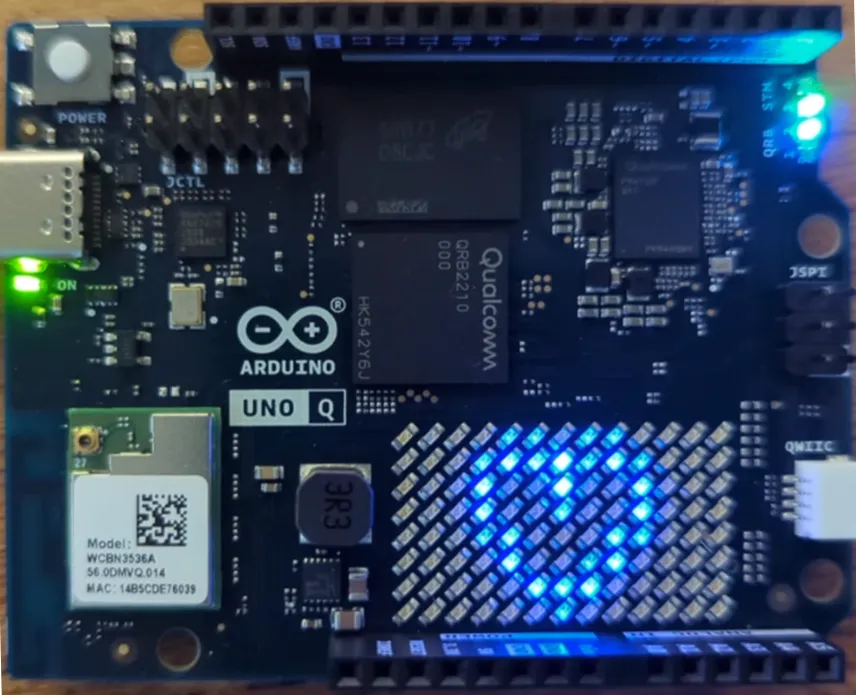
Figure 2.3. The Arduino UNO Q. The Qualcomm QRB2210 and its RAM are in the centre, the Wi-Fi module is at the bottom left and the 8 × 13 LED matrix at the bottom right; the shield headers along the top and bottom edges belong to the STM32U585. (From my article Getting to know the Arduino UNO Q.)
On the UNO Q, the STM32 microcontroller owns the physical shield headers, the analogue inputs, the timers, and the onboard 8×13 LED matrix, while the Qualcomm Linux processor owns the network, storage, camera pipelines, and AI models. The two processors communicate over an internal high-speed serial link running a Remote Procedure Call (RPC) bridge.17 Whether the two processors sit on two separate boards (Raspberry Pi + ESP32), two chips on one PCB (Arduino UNO Q), or two cores inside one SoC die (BeagleBone PRUs and BeagleY-AI), the architectural division of labour is identical.
Open or closed, and one board with two brains
Pick a view, then click any block.
Read down each column: the Pi is open from the kernel up and closed below it; the BeagleBone is open, or documented, all the way down.
Figure 2.4. Two summaries of this section. Open or closed: the layers of a Raspberry Pi 4 and a BeagleBone Black from the board design up to your application. Dual brain: the UNO Q’s Linux and Zephyr halves joined by the Bridge, and the three ways to place two tiers.
🧩 Knowledge Check
Section titled “🧩 Knowledge Check”Match the gateway feature to what it provides
An old program drives the GPIO pins by mapping BCM2711 registers through /dev/mem. It works on a Raspberry Pi 4. Why does it fail on a Raspberry Pi 5?
Which of the following statements about the HAT ID EEPROM on header pins 27 and 28 are correct?
Why does this section suggest covering header pins 2 and 4 when a breadboard circuit needs only 3.3 V?
Footnotes
Section titled “Footnotes”-
E. Brown, “Linus Torvalds Talks IoT, Smart Devices, Security Concerns, and More [Video],” Linux.com, 6 May 2016. Available: linux.com/news/linus-torvalds-talks-iot…. ↩
-
Raspberry Pi Ltd, Raspberry Pi 4 Model B: Specifications. Available: raspberrypi.com/products/raspberry-pi-4-model-b. ↩
-
Raspberry Pi Ltd, Raspberry Pi 5: Specification. Available: raspberrypi.com/products/raspberry-pi-5. ↩ ↩2
-
E. Upton, “More memory-driven price rises,” Raspberry Pi News, 2 Feb. 2026. Available: raspberrypi.com/news/more-memory-driven-price-rises. ↩
-
E. Upton, “Price increases for 2GB Raspberry Pi 4 and Raspberry Pi 5,” Raspberry Pi News, 1 Oct. 2026. Available: raspberrypi.com/news/price-increases-for-2gb-…. ↩
-
Raspberry Pi Ltd, “Raspberry Pi 4 on sale now from $35,” Raspberry Pi News, 24 June 2019. Available: raspberrypi.com/news/raspberry-pi-4-on-sale-now-from-35. ↩ ↩2 ↩3
-
Raspberry Pi Ltd, Raspberry Pi RP1 Peripherals, datasheet, build date 2023-11-07. Available: datasheets.raspberrypi.com/rp1/rp1-peripherals.pdf. ↩ ↩2
-
Raspberry Pi Ltd, Raspberry Pi hardware (sections “Power supply”, “Real Time Clock (RTC)” and “40-pin GPIO header”), Raspberry Pi Documentation. Available: raspberrypi.com/documentation/computers/raspberry-pi.html. ↩ ↩2 ↩3 ↩4
-
Raspberry Pi Ltd, “Introducing: Raspberry Pi 5!,” Raspberry Pi News, 28 Sept. 2023. Available: raspberrypi.com/news/introducing-raspberry-pi-5. ↩ ↩2
-
Raspberry Pi Ltd, Raspberry Pi HAT+ Specification, build date 2024-12-05. Available: datasheets.raspberrypi.com/hat/hat-plus-specification.pdf. ↩ ↩2
-
Raspberry Pi, Add-on boards and HATs: design guide (
designguide.md), original HAT specification (deprecated), GitHub. Available: github.com/raspberrypi/hats. ↩ ↩2 -
Raspberry Pi Ltd, Raspberry Pi Compute Module 5: Specification. Available: raspberrypi.com/products/compute-module-5. ↩
-
KUNBUS GmbH, RevPi Connect 5, product page. Available: revolutionpi.com/en/revpi-connect-5. ↩
-
Texas Instruments, AM3358 Sitara processor: Arm Cortex-A8, PRU-ICSS, product page. Available: ti.com/product/AM3358. ↩
-
BeagleBoard.org Foundation, BeagleBone Black (System Reference Manual, chapters 5 and 7), BeagleBoard Documentation. Available: docs.beagleboard.org/boards/beaglebone/black. ↩ ↩2
-
BeagleBoard.org Foundation, BeagleY-AI: Introduction, BeagleBoard Documentation. Available: docs.beagleboard.org/boards/beagley/ai. ↩
-
Arduino, UNO Q (hardware documentation and tech specs), Arduino Docs. Available: docs.arduino.cc/hardware/uno-q. ↩ ↩2 ↩3 ↩4
-
M. Majonchi, “A heads-up on the Arduino UNO Q board pricing, straight from Marcello Majonchi,” Arduino Blog, 26 June 2026. Available: blog.arduino.cc/2026/06/26/…. ↩
-
Broadcom Corporation and Raspberry Pi (Trading) Ltd,
LICENCE.broadcom, Raspberry Pi firmware repository, GitHub. Available: github.com/raspberrypi/firmware/…/LICENCE.broadcom. ↩ -
Octavo Systems, OSD335x and OSD335x-SM System-in-Package, product pages. Available: octavosystems.com/octavo_products/osd335x and octavosystems.com/octavo_products/osd335x-sm. ↩
-
Qualcomm, “Qualcomm to Acquire Arduino: Accelerating Developers’ Access to its Leading Edge Computing and AI,” press release, 7 Oct. 2025. Available: qualcomm.com/news/releases/2025/10/…. ↩
© 2026 Derek Molloy, Dublin City University. All rights reserved.